
GPS Fishing Tracker1.152 - Google Play
You'll be able to see results in few seconds.
Publisher Description

Are you a professional fisher or your hobby is the fishing? You want to save your fishing locations, your fishing routes, your catches and to navigate to these fishing locations and routes? This free app is made to enhance your fishing activities and to solve the most of the problems that fishers face.
GPS fishing tracker application is an excellent tool which will help you to save and manage your fishing locations, fishing routes, catches and will help you to navigate to these fishing locations and routes. The application let you record your fishing routes and save them for the review and analysis. For the saved fishing routes you can navigate from your current position to the beginning, to the end and to follow the fishing route. You can see all the fishing locations and routes totally on the map as a marker for each location and as two markers connected by a line (the first in the beginning of the route and the last in the end) for each route. Also this app provide you a magnetic compass, you can find an address using coordinates, you can find coordinates and address by clicking on map and you can find the distance in straight line using either coordinates or by clicking on map. Moreover you can get coordinates (longtitude and latitude), speed, altitude, bearing, full address (street address, state, zip, country, etc.) and to see your current location on map using GPS provider in real time.
Features:
1. Find the address using coordinates. Complete the longtitude and the latitude and see with a marker the point on the map. Click on the marker and see the full address.
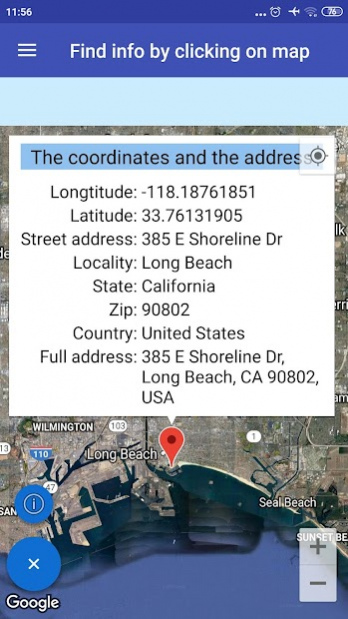
2. Find the coordinates by clicking on map. Click somewhere on the map and a marker will be displayed. Click on the marker and see the coordinates and the full address.
3. Magnetic compass.
4. You can get the current location information in real-time using gps provider. More specifically you can get longtitude, latitude, altitude, accuracy, bearing, speed, provider, address, locality, state, zip, country and thorough fare every time duration and distance you select by settings.
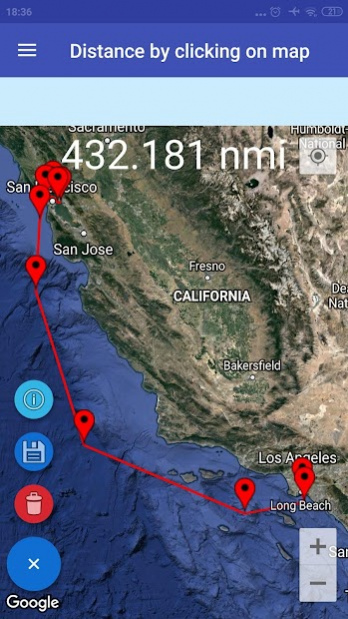
5. Find the distance in straight line between two points using coordinates and between two or more points by clicking on map. You can save and manage the distances.
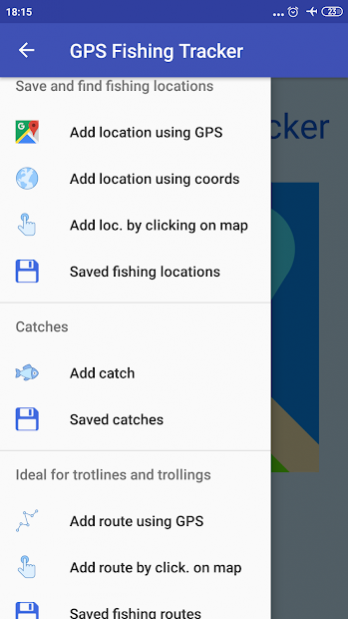
6. You can save and manage your fishing location (in real time using GPS provider or using coordinates or by clicking on map). Moreover you can navigate to a specific fishing location.
7. You can save and manage your catches.
8. You can save and manage your fishing routes (ideal for trotlines and trollings). The application let you record and your fishing routes (the title, the notes, the beginning longtitude and latitude, the end longtitude and latitude, the start time, the arrival time, the duration, the distance, the max speed, the average speed and the saved updated date) and save them for the review and analysis. Moreover you can navigate from your current location to the beginning, to the end and to follow fishing route.
9. You can see all the fishing locations totally on the map as a marker for each location. Click on a marker of a specific location to see the information.
10. You can see all the fishing routes totally on the map as two markers connected by a line (the first in the beginning of the route and the last in the end) for each route. Click on a marker of a specific route to see the information.
11. Settings. There are many settings to help you to adapt the application in your needs.
If select to display or not the current location (when find information (the address and the coordinates) by clicking on map, the distance by clicking on map, add a fishing location by clicking on map and add a fishing route by clicking on map) using network location and does not be displayed please clean your cache files, memory etc. from your phone.
I used some icons from https://icons8.com
About GPS Fishing Tracker
The company that develops GPS Fishing Tracker is Individual Android Developer. The latest version released by its developer is 1.152.
To install GPS Fishing Tracker on your Android device, just click the green Continue To App button above to start the installation process. The app is listed on our website since 2022-05-17 and was downloaded 0 times. We have already checked if the download link is safe, however for your own protection we recommend that you scan the downloaded app with your antivirus. Your antivirus may detect the GPS Fishing Tracker as malware as malware if the download link to com.gps_fishing_tracker.advanced_fishing_tool is broken.
How to install GPS Fishing Tracker on your Android device:
- Click on the Continue To App button on our website. This will redirect you to Google Play.
- Once the GPS Fishing Tracker is shown in the Google Play listing of your Android device, you can start its download and installation. Tap on the Install button located below the search bar and to the right of the app icon.
- A pop-up window with the permissions required by GPS Fishing Tracker will be shown. Click on Accept to continue the process.
- GPS Fishing Tracker will be downloaded onto your device, displaying a progress. Once the download completes, the installation will start and you'll get a notification after the installation is finished.
Program Details
System requirements
Download information
Pricing
Version History
version 1.152
posted on 2022-05-17
v. 1.152:
1. Minor bug fixes.
2. Some User Interface and other improvements.
version 1.151
posted on 2022-05-07
v. 1.151:
1. Minor bug fixes.
2. Some User Interface and other improvements.
version 1.150
posted on 2022-04-27
v. 1.150:
1. Minor bug fixes.
2. Some User Interface and other improvements.
version 1.149
posted on 2022-04-17
v. 1.149:
1. Minor bug fixes.
2. Some User Interface and other improvements.
version 1.147
posted on 2022-03-29
v. 1.147:
1. Minor bug fixes.
2. Some User Interface and other improvements.
version 1.143
posted on 2022-02-18
v. 1.143:
1. Minor bug fixes.
2. Some User Interface and other improvements.
version 1.142
posted on 2022-02-08
v. 1.142:
1. Minor bug fixes.
2. Some User Interface and other improvements.
version 1.141
posted on 2022-01-29
v. 1.141:
1. Minor bug fixes.
2. Some User Interface and other improvements.
version 1.140
posted on 2022-01-16
v. 1.140:
1. Minor bug fixes.
2. Some User Interface and other improvements.
version 1.139
posted on 2022-01-05
v. 1.139:
1. Minor bug fixes.
2. Some User Interface and other improvements.
Disclaimer
Official Google Play Link
We do not host GPS Fishing Tracker on our servers. We did not scan it for viruses, adware, spyware or other type of malware. This app is hosted by Google and passed their terms and conditions to be listed there. We recommend caution when installing it.
The Google Play link for GPS Fishing Tracker is provided to you by apps112.com without any warranties, representations or guarantees of any kind, so access it at your own risk.
If you have questions regarding this particular app contact the publisher directly. For questions about the functionalities of apps112.com contact us.
